When you reply to someone, two separate things happen. Your reply is added to the thread, and X decides whether to put it in that person's notifications. This post is about the second part. X added its notification rules to the public code between October 23 and November 6, 2026, and I read all of them. The short version: if the person follows you, they're almost always notified. If they don't, there's a list of reasons they won't be.
Why does the notification matter?
When you reply to an account that doesn't know you, the notification is usually how they find out you said anything. The reply still sits in the thread, but in a big thread it can be one of hundreds. If X doesn't notify them, the person you were talking to may never see it.
Not being notified is a different thing from being hidden. The checks in this post only decide whether a notification is sent. Where your reply shows in the thread is decided elsewhere.
Does it matter whether they follow you?
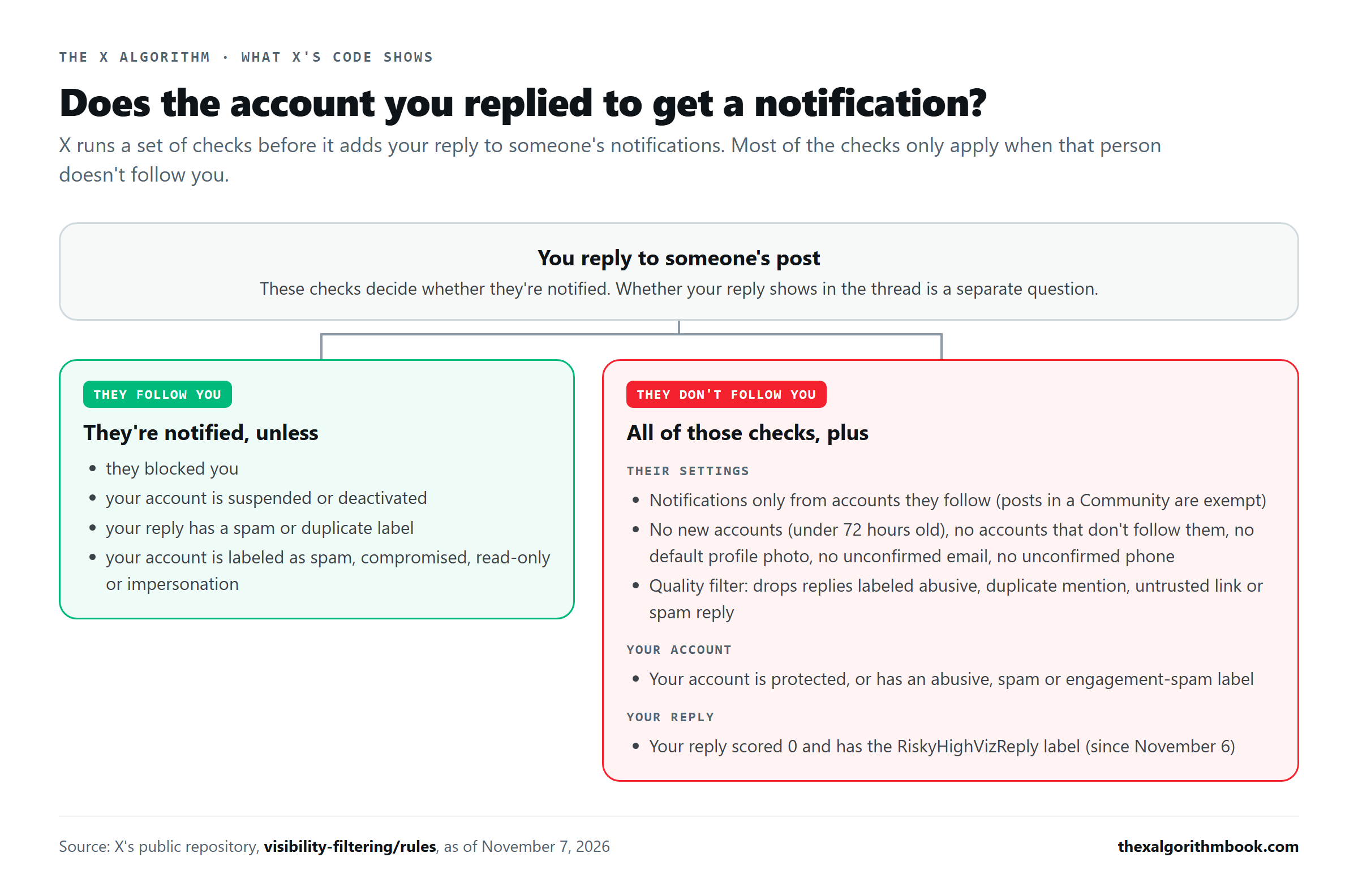
Yes, more than anything else. Almost every check in X's notification rules only applies to people who don't follow you. If the person you replied to follows you, they're notified unless one of these is true: - they blocked you - your account is suspended or deactivated - your reply carries a spam or duplicate-content label - your account carries a label for spam, a compromised account, a read-only account or impersonation
If they don't follow you, all of those checks still apply, plus the ones below.
Which of their settings can stop the notification?
X lets everyone filter their notifications under Notifications, then Settings, then Advanced filters. Each filter in that menu has a matching rule in the code. All of them are skipped for accounts the person follows. If they've turned one on and you match it, they aren't notified: - Accounts you don't follow. Notifications only from accounts they follow. Since October 30, there's one exception: a reply, mention or photo tag posted inside a Community still gets through. - New accounts. In the code, a new account is one created less than 72 hours ago. - Accounts that don't follow you. If you don't follow the person you replied to, this filter catches you. - Default profile photo. An account that never set a profile picture. - No confirmed email. - No confirmed phone number.
There's also the quality filter, a separate switch in the same settings. X's help page says it's on by default for new users and anyone who reinstalls the app. When it's on, X drops notifications from accounts the person doesn't follow if the reply carries one of four labels (abusive, duplicate mention, untrusted link, or spam reply) or the replying account has a label the code calls BlinkWorst.
Which things about your account can stop it?
These apply to people who don't follow you, whatever their settings are: - Your account is protected. If only your followers can see your posts, people who don't follow you aren't notified of your replies. - Your account has certain labels. The code drops notifications from accounts labeled abusive, from accounts with two kinds of spam label, from accounts labeled as engagement spammers, and from accounts with a label the code names without explaining (NotGraduated).
X doesn't tell you when your account gets one of these labels, and the public code doesn't show how they're assigned.
Which things about your reply can stop it?
One more, added on November 6. When X's AI scores a reply 0 on its 0-to-3 scale, the reply gets a label called RiskyHighVizReply. A reply with that label isn't sent as a reply or mention notification to anyone who doesn't follow you. Accounts with a credibility score of 66 or more, grey-badge accounts and X's test accounts don't get the label. I covered how the score works in Does X penalize pasted replies? What the code says.
When did these rules show up?
These are the dates each piece first appeared in X's public code. X may have used some of them earlier. - October 23: the "accounts you don't follow" filter and the account-label checks. - October 29: the other five advanced filters. - October 30: separate rule sets for reply, mention and photo-tag notifications, and the Community exception. - November 6: the RiskyHighVizReply check.
What can you do about it?
Some of these you control, and they cost nothing: - Set a profile photo. Accounts with the default photo are filtered by anyone who has that filter on. - Confirm your email and phone number in your account settings. - Don't expect much from your first three days. A brand-new account is filtered by anyone who blocks new accounts. - Keep your account public if you want people who don't follow you to see your replies. - Follow the accounts you reply to often. Some people only want notifications from accounts that follow them, and following them gets you past that filter. - Don't post the same reply over and over or link to sites X doesn't trust. Duplicate mentions and untrusted links are two of the labels in these rules. The reply scorer is also told how many replies you posted and how many people blocked you in the last 24 hours.
The rest, like someone's choice to see notifications only from accounts they follow, is up to them. When a reply to a big account gets no response, this is one of the possible reasons. They may never have been notified.
The code is in X's repository under visibility-filtering/rules, and X's own description of the filters is on its Notifications help page. Your edition of the book is updated in the November 25 drop.
Source: X's published code, commit 7fef3ba.
What to do about it is in the book. Updates say what changed. The book explains how the feed works and what to do, and it's revised every month from X's code.
See what it costs